Day Two: Reviewing AI-Generated Changes
In the first post of this series, we opened an unfamiliar repository, generated an application model, and used the application graph to get to know Online Boutique. Now the application needs a change.
Say we want the Online Boutique shoppers to see their past orders. You ask Copilot to build the feature, and a few minutes later you have a pull request with 43 changed files and more than 7,000 new lines added. The change includes protocol buffer definitions, generated client code, a new Go service, updates to two existing services, an HTML template, and deployment configurations.
Every file deserves a review, but first we need to understand how the change affects the application’s architecture. Which services are new or modified? What dependencies have changed? Does the resulting architecture match the intended design? The application graph diff in Radius Canvas helps reviewers answer these questions before they dive into the code.
About this series
This post is the second in a series about Radius Canvas for the GitHub Copilot app. Radius Canvas gives you an application graph: a picture of your application’s workloads, the resources they depend on, and the connections between them, drawn from an application model that lives in your repository.
Each post in the series follows a developer through one stage of working with an application: getting to know it, reviewing changes to it, and taking it all the way to the cloud. We are moving to the next stage: reviewing AI-generated changes to the application and using the graph diff to understand how it affects the application’s architecture before the pull request is merged.
Adding order history with Copilot
Using the Online boutique repository and application model from the first post, we asked Copilot to add an order history page:
Add an order history page so shoppers can see their past orders.
Copilot added a new orderhistoryservice written in Go, backed by a PostgreSQL
database. It updated checkoutservice to record each completed order and frontend
to show an Orders page that reads from the new service. It also updated the
application model in .radius/app.bicep to describe the new service, the database, and
the new connections.
Updating the model is part of making the change. The application graph is drawn from
.radius/app.bicep, so as the architecture evolves, the model evolves with it, in the
same branch.
Reviewing the changes in Diff view
Before opening a pull request, review the change where you made it. In the GitHub Copilot app, ask Copilot
Show me the application graph diff for this branch.
Radius Canvas compares the application models on your branch and the base branch, then shows a graph highlighting the changes to the resources:
- Green resources were added.
- Yellow resources were modified.
- Red resources were removed.
- Grey resources did not change.
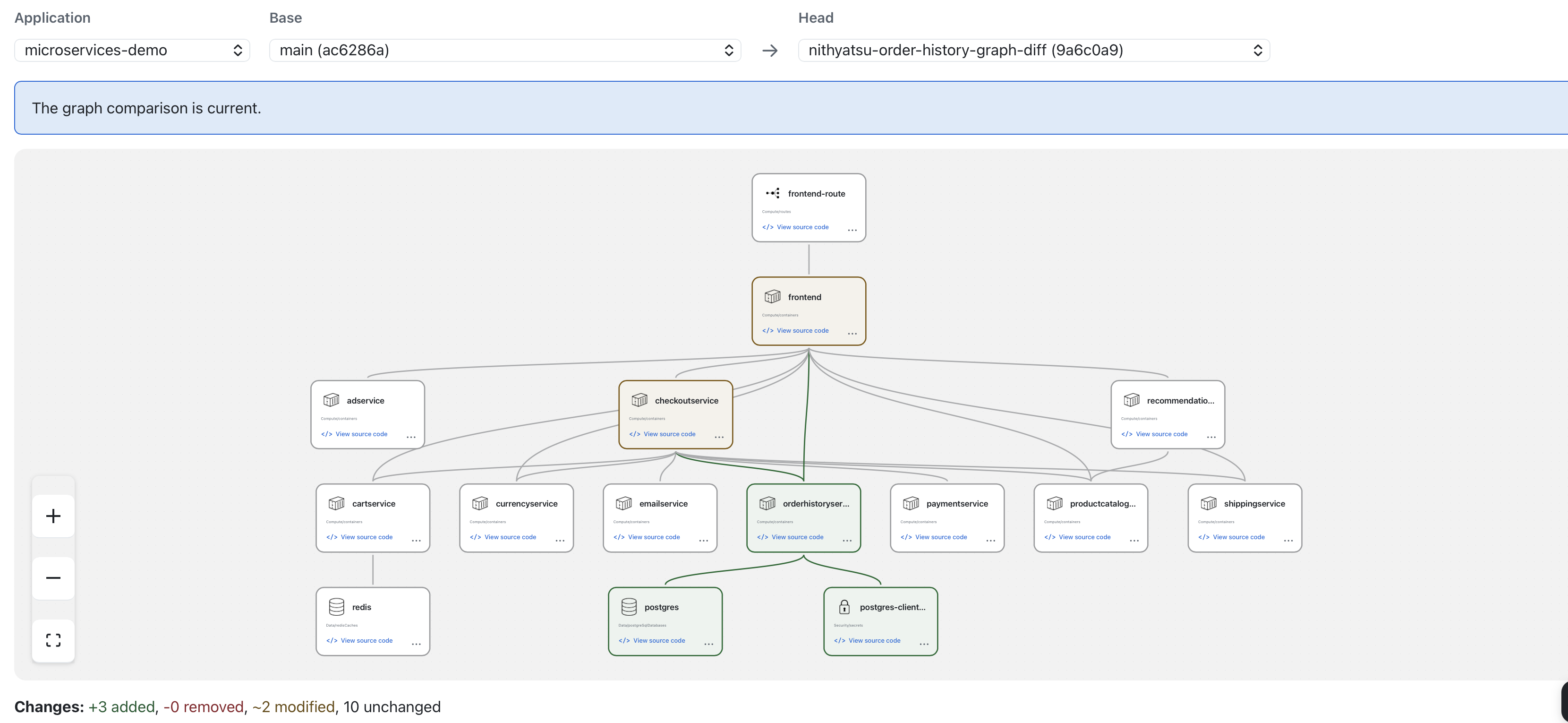
For the order history change, the diff shows:
- Added:
orderhistoryservice, a PostgreSQL database calledpostgres, andpostgres-client-credentials, the secret that holds the database password. - Modified:
checkoutserviceandfrontend, which now both connect toorderhistoryservice. - Unchanged: the other ten resources, including
cartservice,paymentservice, andredis.
Although the change spans 43 files, its architectural impact is concise: three resources added, two services modified, and ten resources unchanged.
Validating the change
With that picture, the review can start with a few architectural questions:
- Is this what we asked Copilot to do? The change adds a service that stores orders, a page that shows them, and checkout recording each order. Yes.
- Did anything change that shouldn’t have? The payment, shipping, and cart services are untouched, and the change does not use the existing Redis cache.
- Are the new pieces the right ones? A new PostgreSQL database is a real decision: it is one more thing to run, back up, and secure. This is the time to decide on it, before the code is merged rather than after it is deployed.
One connection is worth a closer look: checkoutservice now calls
orderhistoryservice. In the first post, we saw that checkoutservice is where a single
order touches most of the application, and that a problem in any of its dependencies
can affect checkout. Now it has a seventh dependency. It’s worth checking the code to see what happens
to checkout if order history is slow or unavailable.
From the graph to the code
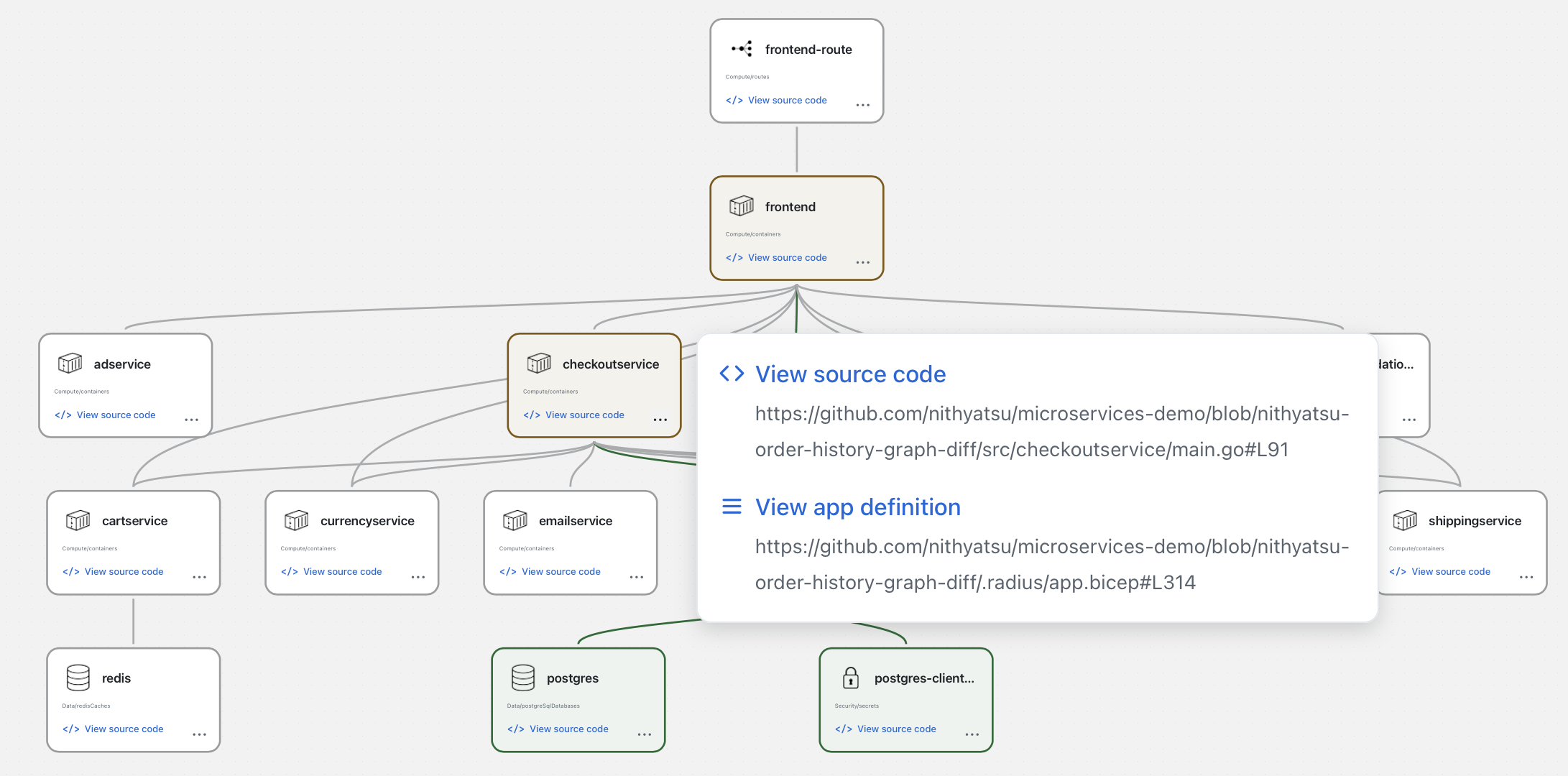
Selecting checkoutservice in the graph and choosing View source code opens
src/checkoutservice/main.go. The new call is in PlaceOrder, after the confirmation
email is sent:
if err := cs.recordOrderHistory(ctx, req.UserId, req.Email, orderResult, &total); err != nil {
    log.Warnf("failed to record order %q in order history: %+v", orderResult.OrderId, err)
}
If the call fails, checkout logs a warning and the order still goes through as intended. However, the call happens while the shopper waits, and has no timeout of its own, so a slow order history service makes checkout slow too.
The graph doesn’t reveal that behavior; the code does. The graph points us to the connection where this detail matters, among 43 files.
Iterating with Copilot
Because we found the issue before opening a pull request, we can ask Copilot to fix it in the same session:
Give the order history call in checkoutservice a short timeout so a slow order history service can’t slow down checkout.
The fix stays inside checkoutservice, so the architecture does not change: refreshing
the diff view shows the same three added and two modified resources. When a follow-up
does change the architecture, such as switching the database or adding a dependency,
the diff view shows it right away, and you can keep iterating until the graph matches
the design you intended.
Sharing the change in the pull request
Once you are happy with the change, ask Copilot to open the pull request. Copilot adds the same application graph diff to the top of the pull request description.
Because the diff is part of the pull request description, everyone reviewing the change sees it on GitHub, including teammates who are not using the GitHub Copilot app. It is the first thing they see, before the list of changed files, so they start from the same architectural understanding you built while reviewing.
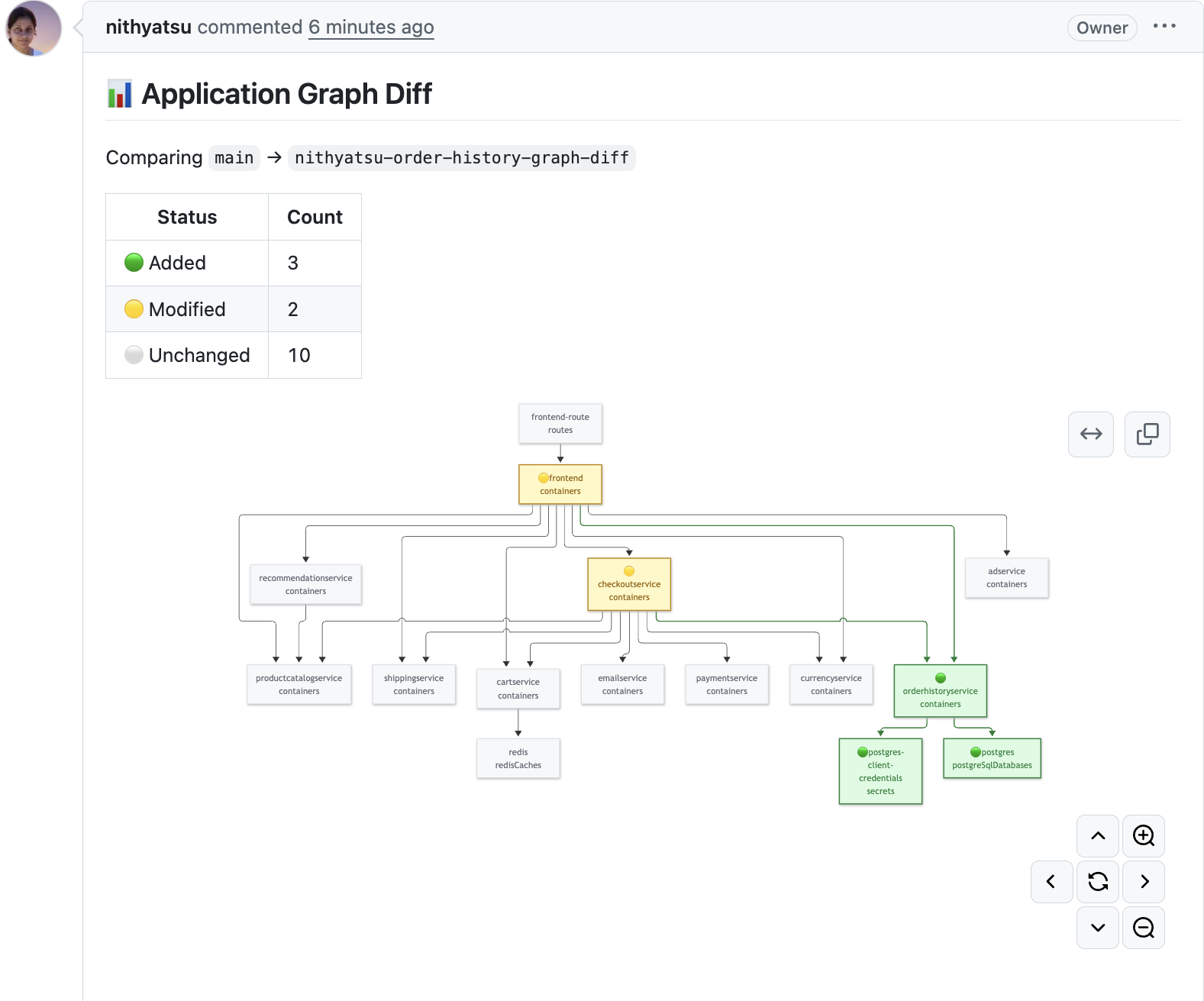
Reviewers using the GitHub Copilot app can open the same diff in Radius Canvas for any pull request and follow nodes to the code:
Show me the application graph diff for this pull request.
A few things to keep in mind
The diff compares application models. Both branches need a committed
.radius/app.bicep, and the diff is only as accurate as those files. If a change
alters the architecture without updating the model, the graph will not show it. Asking
Copilot to update the model as part of the change, as we did here, keeps them in step.
The graph shows architecture, not logic. It tells you which services and resources changed and how they connect. It does not replace reviewing the code; it helps you decide where to read first.
See it in action
If you are working on a change to an application of your own, try asking for the graph diff and let us know how it looks. We would love to hear what works well and what doesn’t.
Up next
The change is reviewed and merged. In the next post, we will take it to the cloud: planning the rollout, deploying with Radius, and watching each resource’s status live in the graph as the deployment runs. Stay tuned!
Learn More
- GitHub Copilot app integration in the Radius documentation
- Day One in an Unknown Repo, the first post in this series
- Introducing Radius Canvas, the public preview announcement
- Radius Canvas roadmap, where you can vote on what comes next
- Join the discussion or ask for help on the Radius Discord server
- Subscribe to the Radius YouTube channel for more demos